
Paperless Post Scams | The Hidden Danger in Digital Invitations
Author: Adam Collins
A friendly invitation to a summer party or alumni event is now one of the most effective ways criminals hijack your email and drain your bank account. Attackers know you are suspicious of random security alerts from your bank, but expect emails from trusted friends. They exploit this social trust to lower your guard so you click a link and hand over your credentials.
Key Takeaways
- Attackers spoof digital invitation platforms to trick you into entering your email password or downloading malicious software.
- A single compromised email account allows scammers to bypass financial security checks and spread fraud to your entire contact list.
- Never enter your email password to view a digital card or event invitation.
- Dedicated safety checkers can analyze suspicious links before you click to verify if they point to genuine platforms.
The Scale of the Problem
According to data from the Federal Bureau of Investigation (FBI) Internet Crime Complaint Center (IC3), phishing and spoofing consistently rank among the most frequently reported cybercrimes. These attacks lead directly to unauthorized account access that fuels broader financial fraud.
Consumer warnings from the Federal Trade Commission (FTC) highlight that scammers regularly impersonate popular invitation services like Evite and Paperless Post to hijack personal email accounts. Beyond financial loss, this constant barrage takes a heavy personal toll, with cybersecurity research from organizations like McAfee showing that consumers lose significant productive time every week simply identifying and filtering out fraudulent messages.
Why Invitation Scams Are a Unique Threat
Most phishing attempts rely on fear or urgency, claiming your account is locked or a package is delayed. A fake digital invitation relies on positive social obligation. When you receive an email appearing to come from a recognized contact, your immediate reaction is curiosity and warmth.
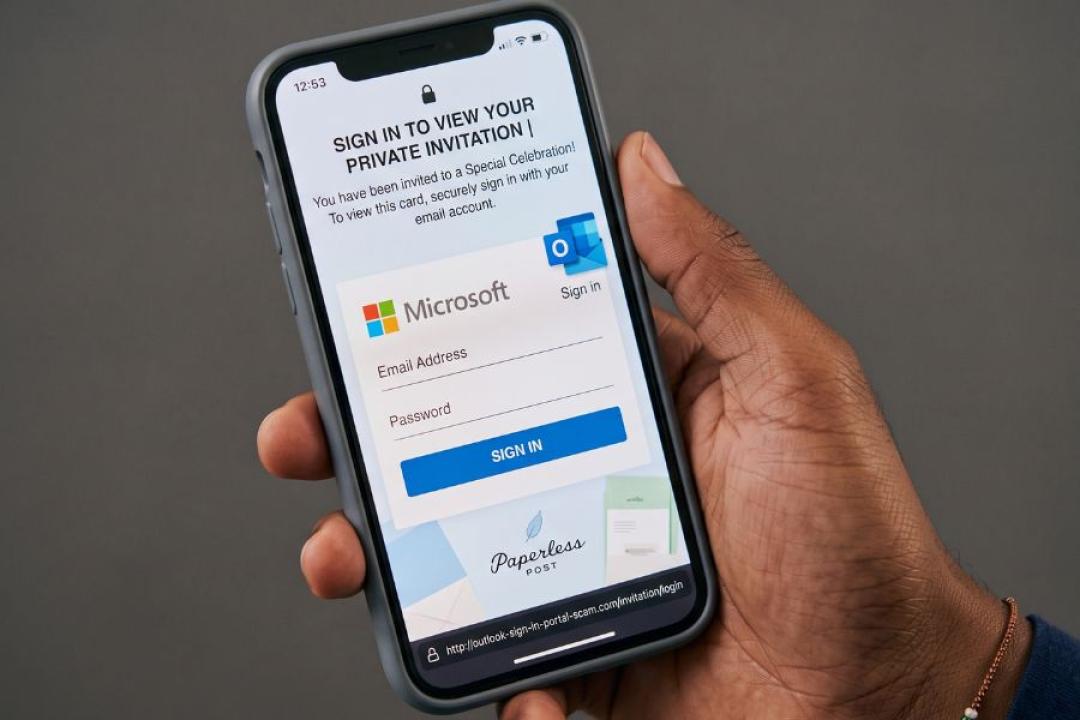
The scammer exploits this reaction to direct you to a disguised login page. Once you enter your credentials, they gain master access to your digital identity.
Why this matters: A compromised email account gives attackers the power to reset your banking passwords, intercept two-factor authentication codes, and drain connected accounts.
How Digital Invitation Scams Work
The attack cycle follows a predictable technical path:
- Initial Compromise: The attacker gains access to a single user's email account.
- Contact Scraping: They extract the account's address book to target known connections.
- Mass Distribution: They send emails disguised as popular invitation platforms with generic subject lines like "You are invited!" or "Special Celebration."
- Credential Harvesting: The "View Card" link directs you to a spoofed Google, Microsoft, or Yahoo sign-in page, claiming you must log in to view the private invite.
- Account Hijacking & Persistence: Once captured, the scammer logs into your real inbox, sets up hidden email forwarding rules to intercept sensitive communications, and replicates the attack across your contact list.
Credential Harvesting vs. Malware Payloads
While password theft is the primary goal, some invitation scams deliver malware.
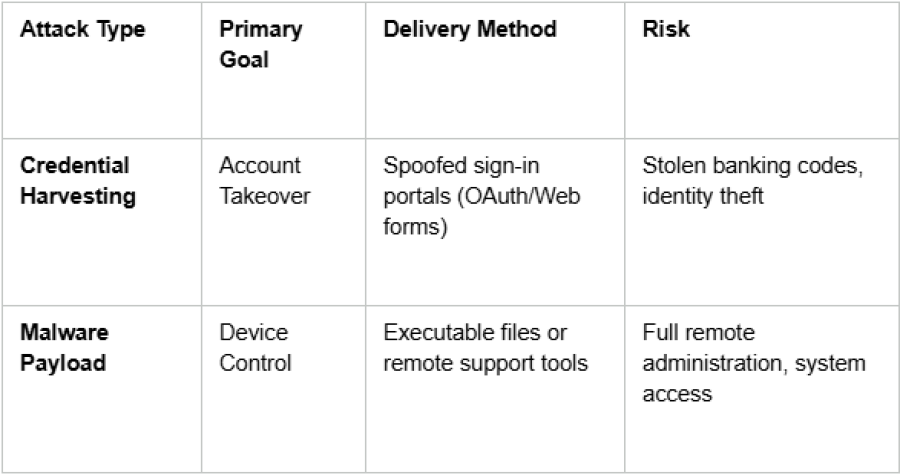
In malware-focused campaigns, clicking the invite link prompts you to download a file or install a program (such as repurposed remote administration software) under the guise of playing an animated greeting card or updating a viewer plugin.
Real-World Attack Scenarios
- Direct Account Hijacking & Financial Fraud: A victim receives a party invite from a friend's real address, clicks through, and enters their email password. Attackers immediately log in, monitor the inbox for banking communications, and intercept one-time security passcodes to process unauthorized transfers.
- Repurposed Remote Administration Tools: In documented campus and corporate phishing campaigns, fraudulent event invites do not ask for a password. Instead, they prompt the user to download remote software like ScreenConnect or AnyDesk to view event details, giving attackers full desktop access that bypasses standard antivirus detection.
- Gift Card & E-Commerce Drain: Upon capturing account access, automated bots or human attackers quickly scan stored receipts, reset connected retail passwords (such as Amazon or eBay), and purchase digital gift cards before the victim notices the unauthorized session.
- Automated Contact Chain Reactions: Once a single user falls for a fake login page, their inbox immediately sends identical malicious invites to hundreds of contacts, exploiting established trust to exponentially multiply the attack.
Identifying Legitimate vs. Fake Invitations
Before entering details or interacting with an invite, evaluate the message against these key red flags:
- Forced Logins: The link demands your email username and password just to view an event summary.
- Suspicious File Downloads: The message asks you to download an attachment or installer to open a card.
- URL Mismatches: Hovering over the link reveals a domain that does not belong to the official service (e.g., missing official domains like paperlesspost.com or pp.events).
- Context Disconnects: The sender is someone you know, but the event details, location, or timing make no sense for your relationship.
- Vague Details: The invite lacks specific information regarding the host, venue, or occasion.
Step-by-Step Security Checklist
If you receive a digital invitation that raises suspicion, follow this verification workflow:
- Do not click the link: Avoid interacting with buttons embedded inside the message.
- Verify out-of-band: Text or call the host directly via a known phone number to confirm they sent an invite.
- Inspect the destination: Hover over the button to view the actual URL without clicking it.
- Run a safety check: Copy the link address and analyze it using established domain verification tools (such as ScamAdviser or VirusTotal) to check domain age and trust scores.
- Check active account sessions: Regularly review your email provider’s active login sessions and revoke access for any unfamiliar devices or locations.
Protecting your digital footprint starts with treating unexpected login prompts as immediate red flags. A genuine host will never require you to hand over your email credentials just to RSVP to a party.
See More interesting articles from ScamAdviser:
- Fake Party Invitation Scams: How They Work and How to Spot One
- Fake Evite Scams Are Surging: How to Tell If an Invitation is Real
- Frnds of Frnds or Friends of Friends Invite Text Messages Scam
Adam Collins is a cybersecurity researcher at ScamAdviser who operates under a pseudonym for privacy and security. With over four years on the digital frontlines, he specialises in translating complex threats into actionable advice. His mission: exposing red flags so you can navigate the web with confidence.
Report a Scam!

Have you fallen for a hoax, bought a fake product? Report the site and warn others!
Scam Categories
Help & Info
Top Safety Picks
Your Go-To Tools for Online SafetyDisclaimer: Some of the links here are affiliate links. If you click them and make a purchase, we may earn a commission at no extra cost to you.
- ScamAdviser App : That site looks legit. That's exactly how they get you. Modern scams are frighteningly convincing. ScamAdviser scans sites and blocks fraud calls automatically. Free on iOS & Android.
- NordVPN : NordVPN delivers powerful, seamless protection for your online life - whether you're at home, on public Wi-Fi, or traveling abroad. Recognized as one of the fastest VPN services available, it combines lightning-fast speeds with advanced encryption to keep
- Incogni : Incogni automatically removes your personal data from data brokers that trade in personal information online, helping reduce scam and identity theft risks without the hassle of manual opt-outs. Reclaim your privacy now!
- Private Internet Access (PIA) : PIA gives you a no-logs VPN built on the latest encryption standards and WireGuard protocol — meaning your browsing activity stays yours alone. Fast, private, and transparent. Take back your privacy today!
- Surfshark VPN : One subscription, unlimited devices. Surfshark is the fastest VPN out there — covering your phone, laptop, tablet and more with a stable, secure connection for browsing, streaming and working. Get Surfshark now!
- Proton VPN : Independently audited and built with a strict no-logs policy, Proton VPN is trusted by over 3 million users worldwide. It’s been named Best VPN by Wired, PCMag, and Vice—offering strong encryption for anyone who takes their privacy seriously. Give Proton
- Mysterium VPN : MysteriumVPN gives you real privacy without relying on a single company to protect it. Built on a decentralized network of independent nodes across the globe, it hides your traffic from ISPs, trackers, and the VPN provider itself. Choose data center IPs f
Popular Stories
In a nutshell: A good VPN protects your privacy with strong encryption, a strict no-logs policy, and fast protocols like WireGuard. The best VPNs also offer wide server coverage, leak protection, and easy-to-use apps for all devices. For 2025, the top providers are NordVPN, ExpressVPN, Surfshark, Proton VPN, Private Internet Access, CyberGhost, and Mullvad—each excelling in speed, security, or value. In an age where every click is tracked, a Virtual Private Network (VPN) is no longer just a luxury—it's an essential tool for digital privacy and security. A VPN works by creating a secure, encrypted tunnel between your device and the internet, masking your real IP address and protecting your sensitive data from prying eyes. But with hundreds of providers out there, how do you sort the secure from the suspect? This guide breaks down the non-negotiable features of a quality VPN and highlights the 7 top-rated services for 2025. What to Look for in a Good VPN: The 4 Non-Negotiable Pillars 1. Ironclad Security Features Strong Encryption: AES-256, the gold standard. Secure Protocols: OpenVPN, WireGuard, NordLynx, Lightway. Avoid PPTP. Kill Switch: Ensures no accidental IP leaks. Leak Protection: Covers DNS, IPv6, and WebRTC. 2. Verified Privacy Practices No-Logs Policy: No activity or metadata tracking. Independent Audits: Verification by third parties. Safe Jurisdiction: Prefer countries outside the 5/9/14 Eyes alliances. 3. High-Speed Performance Fast Protocols: WireGuard and equivalents. Large Server Network: Less crowding, more reliable speeds. 4. Essential Usability Features Multi-Device Apps: Windows, Mac, iOS, Android, routers. Simultaneous Connections: One account, many devices. Unblocking Power: Netflix, Hulu, BBC
This article has been updated by Jamie James on June 9 with the latest data and analysis we have found using real user reports and experiences submitted to ScamAdviser. Just received that terrifying notification? Or perhaps you've noticed suspicious activity in your accounts? Take a deep breath. Your email, password, phone number, home address, payment details, or identity documents may now be in places you cannot control. But the next steps do not have to be confusing. What matters most is how quickly you act, order, and know which exposed data creates the biggest risk. This guide explains what to do after a data breach, how to check the damage, and how to protect yourself from identity theft, account takeover, and follow-up scams. Quick Summary Verify the data breach notice through the company’s official website before clicking any links. Secure your primary email account first because it controls many password resets. Change the exposed password and every reused or similar password. Enable multi-factor authentication on email, banking, payment, cloud, and social accounts. Contact your bank or card issuer if payment or bank account details were exposed. Freeze or protect your credit if sensitive identity information was compromised. Watch for phishing messages, fake refund offers, and scam websites that use your leaked details. Starting with Data Breach Numbers The numbers don't lie: according to a 2024 report, the number of data breach victim notices has grown by a staggering 211% year-over-year. This isn't just a distant threat; it's a stark reality many individuals fa