
Does Indeed Have Scams? | The Rise of Fake Job Postings
Author: Adam Collins
When applying for jobs online, many people wonder, does Indeed have scams? The answer is a costly yes, as job hunters are losing hundreds of millions of dollars to criminals who use legitimate platforms to disguise financial traps.
Key Takeaways:
- Scammers post fake listings on major job boards, then move applicants to private messaging apps to run check fraud or task scams.
- Federal reporting shows employment scams cost victims hundreds of millions annually, destroying savings and credit scores.
- Never pay your own money to secure a job, buy home office equipment, or unlock tasks for commissions.
- Use ScamAdviser's URL checker to verify if the company portal a recruiter sends you is newly registered or known for fraud.
- "We are not hiring you to work; we are hiring you to pay us." This is the unspoken logic behind modern employment fraud.
How Big are Job Scams
According to data from the Federal Trade Commission (FTC), reported losses to job scams have reached over $500 million annually. What this means: The financial damage has multiplied fivefold since 2020, making employment fraud one of the most lucrative cybercrimes.
The FBI's Internet Crime Complaint Center (IC3) reports that tens of thousands of people fall victim to employment scams each year, resulting in individual losses ranging from a few hundred dollars to tens of thousands. What this means: People seeking a paycheck routinely end up emptying their own bank accounts instead.
Data from the Better Business Bureau (BBB) shows that job fraud is consistently the most dangerous scam targeting adults ages 18 to 34. What this means: Young professionals and recent graduates face the highest risk of being targeted during their job search.
Why Employment Fraud is a Different Kind of Threat
Victims of employment fraud are already in a vulnerable state. They need income. This scam abuses the inherent trust in the hiring process. Applicants expect to hand over sensitive data like Social Security numbers and bank details to a new employer. They want to comply with instructions to secure the position.
What this means for ordinary users: The exact actions required to get a legitimate job are exactly what scammers use to steal your identity and your money.
How Fake Jobs Work
The Bait
Scammers create convincing company profiles on Indeed. They post remote work opportunities with attractive pay and low requirements.
The Pivot
Once you apply, the fake recruiter immediately moves the conversation off the job board. They contact you via text messages, WhatsApp, or Telegram.
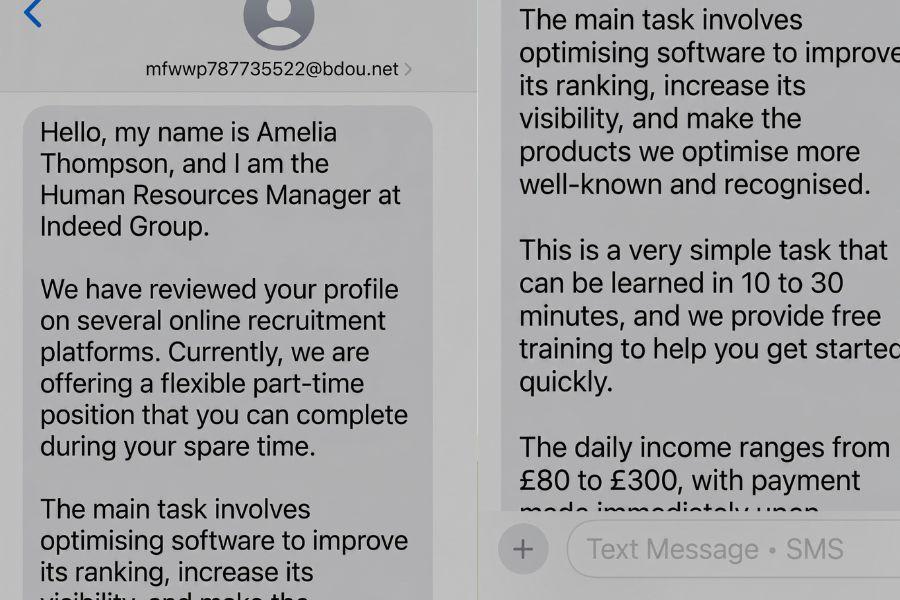
Example of a fake job text scam
The Setup
They conduct text-based or brief phone interviews. They send professional-looking offer letters and onboarding documents to harvest your personal data.
The Extraction
They extract money using two main methods. They either send a fake check for home office equipment and ask you to wire the surplus to their vendor. Or, they force you to pay cryptocurrency to complete online tasks.
Gamified Task Scams
Task scams are a rapidly growing variant of employment fraud. The fake employer tells you your job is app optimization or product boosting. You log into a dashboard and click buttons to rate products. The platform shows you earning commissions. Eventually, the system requires you to deposit your own cryptocurrency to unlock the next tier of tasks and withdraw your earnings.
Key distinction: Unlike traditional fake checks that eventually bounce, task scams trick you into willingly sending cryptocurrency to a dashboard that displays fake, unwithdrawable profits.
Real Cases of Job Scams
$20,000 Lost to a Fake Recruiter
A job seeker received a text from a recruiter using a former employer's name to build trust. She was directed to a fake marketing platform and told to fund online ads with her own money for a promised commission. She ultimately lost roughly $20,000 before realizing the operations were fake.
The lesson: Legitimate work never requires you to front your own cash to fund company operations.
$25,000 Fake Check Trap
A job seeker named Alicia applied for a personal assistant job online. The scammer sent her a fraudulent $11,000 check, followed by a $25,000 check, instructing her to send funds back for supplies. Her bank flagged the transactions and closed her account. The scammer then resorted to threatening her family when the money failed to clear.
The lesson: Depositing a check from an employer who asks you to send a portion of it back is always a scam.
$4,800 Drained After a Fake Interview
A job seeker reported losing $4,800 after applying for a role that hijacked the name and vacancy of a real company. The scammers conducted the entire hiring process via chat without a video call. They tricked the victim into sending funds directly for supposed work materials.
The lesson: Scammers routinely hijack the names of real companies to bypass your initial suspicion.
Does Indeed Have Scams? How to Tell if a Job Posting is Real
Yes, Indeed does in deed have scams. Before you hand over your personal information to a recruiter, you need to ask yourself: is this website legit? Here are the signs that a job offer is a trap.
- The recruiter insists on conducting the entire interview process through text messages or an encrypted app like WhatsApp.
- The company sends you a check before you start working and instructs you to use it to buy equipment from their approved vendor.
- The job description uses vague terms like app optimization without explaining what the actual daily work involves.
- The email address the recruiter uses ends in a generic provider like Gmail or a slightly misspelled version of the real company domain.
- The employer demands that you pay a fee for mandatory training, background checks, or onboarding materials before your first day.
Step-by-Step
- Stop communicating with the recruiter immediately if they ask for money or push you to buy equipment.
- Search the exact company name and the recruiter's name online alongside the word scam or fraud.
- Go directly to the official company website by typing it into your browser, rather than clicking the link provided in the job offer.
- Check the company's official career page to see if the job you applied for actually exists.
- Use a URL checker to scan the company portal link the recruiter sent you before entering any personal information.
How ScamAdviser Helps
Scammers often spin up fake company websites to make their job offers look real. You can use ScamAdviser's website safety checker to verify the domain. You simply paste the link into the search bar. The tool provides a Trust Score and shows exactly when the domain was registered.
If a recruiter claims to represent a ten-year-old company but the website safety check shows the domain was created three days ago, you know it is a scam. This quick step helps you answer the question of is this a legit website before you make a costly mistake.
Broader Habits
Locking Down Your Personal Data
If you already sent your Social Security number or banking details to a fake employer, your identity is at risk. Contact your bank to secure your accounts. Place a freeze on your credit reports with the major bureaus. This prevents scammers from opening new lines of credit in your name.
Verifying the Source
Never trust the contact information provided in an offer letter. Find the real company's official phone number or LinkedIn page independently. Contact their actual human resources department. Ask them directly if they are hiring for the position and if the recruiter who contacted you actually works there. If you want to check a URL for scams, always test the specific login portal the recruiter gave you.
The Bottom Line: Watch out for Indeed Scams
Employment scams turn the hope of a new job into a devastating financial loss. Whether it is losing thousands to a task scam or having a bank account closed over a fake check, the damage is severe and rarely recovered. Funds sent via wire transfer or cryptocurrency are gone the moment they leave your account.
- Never pay money to get a job.
- Never deposit a check and wire money back to an employer.
- Verify every recruiter and company link independently.
- Freeze your credit if you shared your Social Security number.
- Treating your job search with the same skepticism as a financial investment is the only way to keep your bank account intact.
See More interesting articles from ScamAdviser:
- 15 Legit Online Job Sites to Find Real Jobs (and Avoid Scams)
- How Online Job Hunting Sites Are Turning Into Data Goldmines For Scammers- With Examples
- Remote Work Dreams? Beware of Scams!
Adam Collins is a cybersecurity researcher at ScamAdviser who operates under a pseudonym for privacy and security. With over four years on the digital frontlines, he specialises in translating complex threats into actionable advice. His mission: exposing red flags so you can navigate the web with confidence.
Report a Scam!

Have you fallen for a hoax, bought a fake product? Report the site and warn others!
Scam Categories
Help & Info
Top Safety Picks
Your Go-To Tools for Online SafetyDisclaimer: Some of the links here are affiliate links. If you click them and make a purchase, we may earn a commission at no extra cost to you.
- ScamAdviser App : That site looks legit. That's exactly how they get you. Modern scams are frighteningly convincing. ScamAdviser scans sites and blocks fraud calls automatically. Free on iOS & Android.
- NordVPN : NordVPN delivers powerful, seamless protection for your online life - whether you're at home, on public Wi-Fi, or traveling abroad. Recognized as one of the fastest VPN services available, it combines lightning-fast speeds with advanced encryption to keep
- Incogni : Incogni automatically removes your personal data from data brokers that trade in personal information online, helping reduce scam and identity theft risks without the hassle of manual opt-outs. Reclaim your privacy now!
- Private Internet Access (PIA) : PIA gives you a no-logs VPN built on the latest encryption standards and WireGuard protocol — meaning your browsing activity stays yours alone. Fast, private, and transparent. Take back your privacy today!
- Surfshark VPN : One subscription, unlimited devices. Surfshark is the fastest VPN out there — covering your phone, laptop, tablet and more with a stable, secure connection for browsing, streaming and working. Get Surfshark now!
- Proton VPN : Independently audited and built with a strict no-logs policy, Proton VPN is trusted by over 3 million users worldwide. It’s been named Best VPN by Wired, PCMag, and Vice—offering strong encryption for anyone who takes their privacy seriously. Give Proton
- Mysterium VPN : MysteriumVPN gives you real privacy without relying on a single company to protect it. Built on a decentralized network of independent nodes across the globe, it hides your traffic from ISPs, trackers, and the VPN provider itself. Choose data center IPs f
Popular Stories
In a nutshell: A good VPN protects your privacy with strong encryption, a strict no-logs policy, and fast protocols like WireGuard. The best VPNs also offer wide server coverage, leak protection, and easy-to-use apps for all devices. For 2025, the top providers are NordVPN, ExpressVPN, Surfshark, Proton VPN, Private Internet Access, CyberGhost, and Mullvad—each excelling in speed, security, or value. In an age where every click is tracked, a Virtual Private Network (VPN) is no longer just a luxury—it's an essential tool for digital privacy and security. A VPN works by creating a secure, encrypted tunnel between your device and the internet, masking your real IP address and protecting your sensitive data from prying eyes. But with hundreds of providers out there, how do you sort the secure from the suspect? This guide breaks down the non-negotiable features of a quality VPN and highlights the 7 top-rated services for 2025. What to Look for in a Good VPN: The 4 Non-Negotiable Pillars 1. Ironclad Security Features Strong Encryption: AES-256, the gold standard. Secure Protocols: OpenVPN, WireGuard, NordLynx, Lightway. Avoid PPTP. Kill Switch: Ensures no accidental IP leaks. Leak Protection: Covers DNS, IPv6, and WebRTC. 2. Verified Privacy Practices No-Logs Policy: No activity or metadata tracking. Independent Audits: Verification by third parties. Safe Jurisdiction: Prefer countries outside the 5/9/14 Eyes alliances. 3. High-Speed Performance Fast Protocols: WireGuard and equivalents. Large Server Network: Less crowding, more reliable speeds. 4. Essential Usability Features Multi-Device Apps: Windows, Mac, iOS, Android, routers. Simultaneous Connections: One account, many devices. Unblocking Power: Netflix, Hulu, BBC
This article has been updated by Jamie James on June 9 with the latest data and analysis we have found using real user reports and experiences submitted to ScamAdviser. Just received that terrifying notification? Or perhaps you've noticed suspicious activity in your accounts? Take a deep breath. Your email, password, phone number, home address, payment details, or identity documents may now be in places you cannot control. But the next steps do not have to be confusing. What matters most is how quickly you act, order, and know which exposed data creates the biggest risk. This guide explains what to do after a data breach, how to check the damage, and how to protect yourself from identity theft, account takeover, and follow-up scams. Quick Summary Verify the data breach notice through the company’s official website before clicking any links. Secure your primary email account first because it controls many password resets. Change the exposed password and every reused or similar password. Enable multi-factor authentication on email, banking, payment, cloud, and social accounts. Contact your bank or card issuer if payment or bank account details were exposed. Freeze or protect your credit if sensitive identity information was compromised. Watch for phishing messages, fake refund offers, and scam websites that use your leaked details. Starting with Data Breach Numbers The numbers don't lie: according to a 2024 report, the number of data breach victim notices has grown by a staggering 211% year-over-year. This isn't just a distant threat; it's a stark reality many individuals fa