
The Truth About 437 Area Code Scams | Why Your Phone Keeps Ringing
Author: Adam Collins
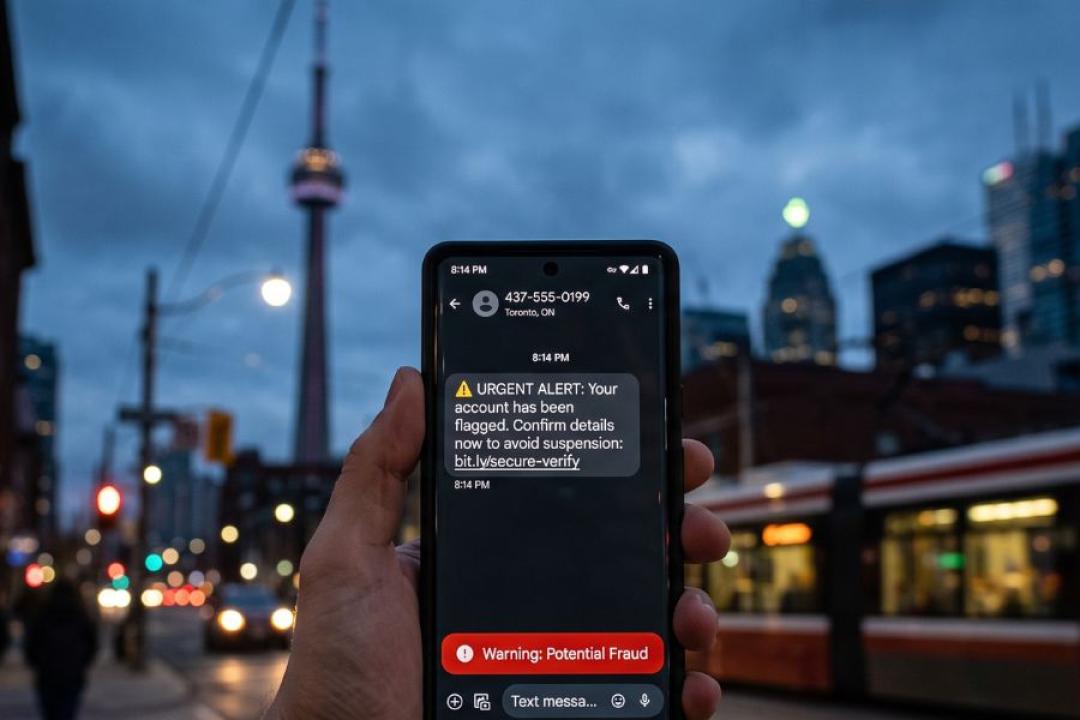
Attackers hijack Toronto's overlay area code to bypass natural skepticism, exploiting local trust to compromise credentials and drain bank accounts.
Key Takeaways
- Scammers spoof the 437 area code to mimic telecom providers, shipping companies, and innocent wrong-number texts.
- Telephone and text-based fraud drains hundreds of millions from Canadians annually through identity theft and credentials harvest.
- Never click links in unsolicited texts or call back unknown numbers without independent verification.
- Use ScamAdviser's URL checker to scan suspicious links sent via text before entering sensitive details.
- Attackers know an international code gets ignored, but local caller IDs trigger immediate trust.
According to the Canadian Anti-Fraud Centre (CAFC), Canadians lost a record CA$704 million to fraud in 2025. With under 10% of victims reporting, actual impact estimates reach billions.
The CRTC introduced Telecom Decision 2026-140, enabling carriers to implement automated network-level blocking against phishing infrastructure. Despite this, spoofed local calls remain a primary entry point for cybercriminals.
Why 437 Area Code Spoofing is a Huge Threat
The 437 area code is an overlay code for Toronto alongside 416 and 647. Criminals use Voice over Internet Protocol (VoIP) software to display this local code on caller IDs worldwide, buying virtual numbers in bulk to blast automated texts and calls.
What this means: A text displaying a 437 number provides zero assurance that the sender is in Canada.
How Number Spoofing Works
- Number Acquisition: Attackers rent virtual 437 numbers from online vendors.
- Automated Blasting: Mass-dialing software delivers urgent alerts regarding failed parcel deliveries, carrier phone upgrades, or account locks.
- Malicious Redirection: The message includes links to fake login portals designed to steal banking access or session tokens.
Smishing (SMS Phishing)
Smishing relies on artificially created urgency rather than long-form persuasion. The goal is forcing rapid action before you can verify the sender.
Active Attack Tactics
The Carrier Phone Upgrade Trap
Scammers spoof 437 numbers while posing as major telecom representatives (e.g., Rogers, Bell, Telus). They offer exclusive phone upgrades, place an unauthorized device order under the victim's legitimate account, and ship it to the victim's address. The scammer then calls back claiming a shipment error, persuading the victim to courier the brand-new device directly to a fraud-controlled address.
Storm-2755 Direct-Deposit Payroll Theft
Threat actors deploy localized 437 spoofing and search manipulation to target Canadian employees. The texts direct victims to fake Microsoft 365 or corporate HR portals. Once victims authenticate, adversary-in-the-middle (AiTM) tools steal session tokens to quietly alter direct-deposit banking information.
Multi-Stage Telecom Impersonation
Attackers send fake security alerts via a local 437 SMS instructing the victim to contact a toll-free number. Calling back connects the victim directly to a fraudulent agent who uses high-pressure tactics to harvest banking credentials.
Scam Indicators in Text Messages
- Shortened URLs: Links using services like bit.ly or altered corporate domains instead of official sites.
- Demand for Alternative Payment: Requests for gift cards, cryptocurrency, or direct e-transfers to resolve emergency issues.
- Artificial Urgency: Claims of frozen bank accounts, missed deliveries, or legal action requiring immediate link clicks.
- Unsolicited Conversation: Friendly wrong-number texts that quickly pivot to investment or money-making opportunities.
- Secondary Call Numbers: Text instructions telling you to call an unknown 1-800 or 1-888 number to resolve account issues.
Step-by-Step Defense
- Pause: Do not click any links or call the 437 number back.
- Verify Independently: Look up the organization's official phone number via their main website or mobile app.
- Isolate Compromised Links: Copy suspicious web addresses without opening them.
- Scan: Paste the link into the ScamAdviser safety checker to view domain age, server location, and user reports.
How ScamAdviser Helps
The ScamAdviser URL checker evaluates links sent from unknown numbers. Pasting a domain into the tool reveals domain registration date, hosting location, and reported malicious activity.
Defensive Habits
Enable Carrier-Level Filtering
Activate built-in spam controls within your mobile messaging app to filter unknown senders, and forward junk SMS to 7726 (SPAM) so carriers can flag the sending source.
Never Engage with Wrong-Number Texts
Replying to unsolicited messages, even to say "wrong number", confirms your line is active. Active numbers are indexed and resold across criminal networks, increasing targeted phishing scams.
A local area code is no longer proof of a local caller. Treat every unexpected message containing a call-to-action as a potential exploit attempt until verified through official channels.
See More interesting articles from ScamAdviser:
- Introducing Call Shield From ScamAdviser: Know Who's Calling Before You Pick Up
- 10 Everyday Habits That Make You an Easy Target for Scammers
- Spot Extortion Text, Dating App Manipulation & Virus Pop-Up Scams
Adam Collins is a cybersecurity researcher at ScamAdviser who operates under a pseudonym for privacy and security. With over four years on the digital frontlines, he specialises in translating complex threats into actionable advice. His mission: exposing red flags so you can navigate the web with confidence.
Report a Scam!

Have you fallen for a hoax, bought a fake product? Report the site and warn others!
Scam Categories
Help & Info
Top Safety Picks
Your Go-To Tools for Online SafetyDisclaimer: Some of the links here are affiliate links. If you click them and make a purchase, we may earn a commission at no extra cost to you.
- ScamAdviser App : That site looks legit. That's exactly how they get you. Modern scams are frighteningly convincing. ScamAdviser scans sites and blocks fraud calls automatically. Free on iOS & Android.
- NordVPN : NordVPN delivers powerful, seamless protection for your online life - whether you're at home, on public Wi-Fi, or traveling abroad. Recognized as one of the fastest VPN services available, it combines lightning-fast speeds with advanced encryption to keep
- Incogni : Incogni automatically removes your personal data from data brokers that trade in personal information online, helping reduce scam and identity theft risks without the hassle of manual opt-outs. Reclaim your privacy now!
- Private Internet Access (PIA) : PIA gives you a no-logs VPN built on the latest encryption standards and WireGuard protocol — meaning your browsing activity stays yours alone. Fast, private, and transparent. Take back your privacy today!
- Surfshark VPN : One subscription, unlimited devices. Surfshark is the fastest VPN out there — covering your phone, laptop, tablet and more with a stable, secure connection for browsing, streaming and working. Get Surfshark now!
- Proton VPN : Independently audited and built with a strict no-logs policy, Proton VPN is trusted by over 3 million users worldwide. It’s been named Best VPN by Wired, PCMag, and Vice—offering strong encryption for anyone who takes their privacy seriously. Give Proton
- Mysterium VPN : MysteriumVPN gives you real privacy without relying on a single company to protect it. Built on a decentralized network of independent nodes across the globe, it hides your traffic from ISPs, trackers, and the VPN provider itself. Choose data center IPs f
Popular Stories
In a nutshell: A good VPN protects your privacy with strong encryption, a strict no-logs policy, and fast protocols like WireGuard. The best VPNs also offer wide server coverage, leak protection, and easy-to-use apps for all devices. For 2025, the top providers are NordVPN, ExpressVPN, Surfshark, Proton VPN, Private Internet Access, CyberGhost, and Mullvad—each excelling in speed, security, or value. In an age where every click is tracked, a Virtual Private Network (VPN) is no longer just a luxury—it's an essential tool for digital privacy and security. A VPN works by creating a secure, encrypted tunnel between your device and the internet, masking your real IP address and protecting your sensitive data from prying eyes. But with hundreds of providers out there, how do you sort the secure from the suspect? This guide breaks down the non-negotiable features of a quality VPN and highlights the 7 top-rated services for 2025. What to Look for in a Good VPN: The 4 Non-Negotiable Pillars 1. Ironclad Security Features Strong Encryption: AES-256, the gold standard. Secure Protocols: OpenVPN, WireGuard, NordLynx, Lightway. Avoid PPTP. Kill Switch: Ensures no accidental IP leaks. Leak Protection: Covers DNS, IPv6, and WebRTC. 2. Verified Privacy Practices No-Logs Policy: No activity or metadata tracking. Independent Audits: Verification by third parties. Safe Jurisdiction: Prefer countries outside the 5/9/14 Eyes alliances. 3. High-Speed Performance Fast Protocols: WireGuard and equivalents. Large Server Network: Less crowding, more reliable speeds. 4. Essential Usability Features Multi-Device Apps: Windows, Mac, iOS, Android, routers. Simultaneous Connections: One account, many devices. Unblocking Power: Netflix, Hulu, BBC
This article has been updated by Jamie James on June 9 with the latest data and analysis we have found using real user reports and experiences submitted to ScamAdviser. Just received that terrifying notification? Or perhaps you've noticed suspicious activity in your accounts? Take a deep breath. Your email, password, phone number, home address, payment details, or identity documents may now be in places you cannot control. But the next steps do not have to be confusing. What matters most is how quickly you act, order, and know which exposed data creates the biggest risk. This guide explains what to do after a data breach, how to check the damage, and how to protect yourself from identity theft, account takeover, and follow-up scams. Quick Summary Verify the data breach notice through the company’s official website before clicking any links. Secure your primary email account first because it controls many password resets. Change the exposed password and every reused or similar password. Enable multi-factor authentication on email, banking, payment, cloud, and social accounts. Contact your bank or card issuer if payment or bank account details were exposed. Freeze or protect your credit if sensitive identity information was compromised. Watch for phishing messages, fake refund offers, and scam websites that use your leaked details. Starting with Data Breach Numbers The numbers don't lie: according to a 2024 report, the number of data breach victim notices has grown by a staggering 211% year-over-year. This isn't just a distant threat; it's a stark reality many individuals fa