
[Scam Alert] Browser Notification Scams
Author: Trend Micro
This article is from Trend Micro.
Web push notifications (also called browser push notifications) are a web browser feature that allows websites to send notifications to users regardless of which sites they have open, and sometimes even if their browsers are closed altogether! They are super-powerful and really handy, but scammers have been exploiting the feature to promote unwanted ads and scam sites, and even send out malicious links containing malware.
If you receive a notification from a malicious website and grant it the permissions it is requesting, you will start to be bombarded by notifications in the bottom right of your screen with fake alerts, messages from fake dating sites, and adverts for products that ARE ALMOST CERTAINLY SCAMS.
Examples of fake notifications
How malicious notifications get on websites
There are two methods that scammers use to get their malicious notifications on to websites. The first requires the exploitation of a hole in a website’s security. The security flaw allows malicious code to be injected into the site that redirects users to a malicious page. On that page, the users are then tricked into enabling the nefarious browser notifications.
The second method is a lot simpler; some websites cooperate with the scammers and willingly inject the redirection code into their sites – presumably for a fee.
Beware of websites that offer illegal content such as:
- Pirated movies
- Pirated software
- Pirated songs
- Illegal streaming
Malicious notifications are regularly found on porn sites, too.
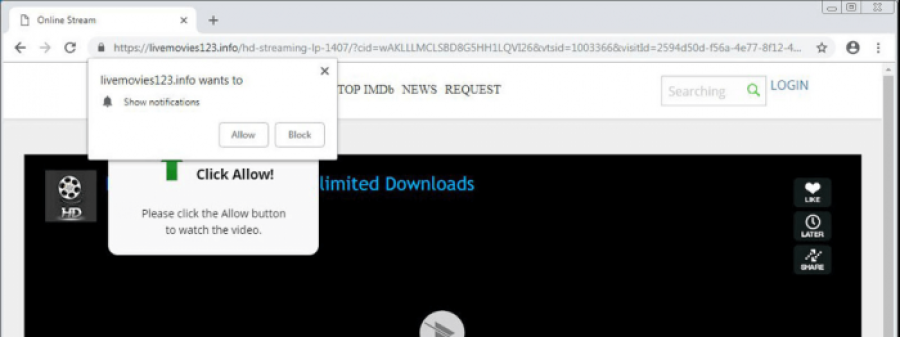
Whenever you visit a site infected with malicious web browser notifications, you will often be randomly redirected to a page asking you to click “Allow”. The site will almost always tell you that you need to do so before you can view certain content or before you can use a certain feature of the site.
For example, on illegal streaming sites, you will often be redirected to a page containing a fake video player and asked to click on the “Allow” button before you can play the video.
How to protect yourself from browser notification scams
- Avoid visiting untrusted websites. View streaming content on reputable websites to minimize the risk that you will be targeted by these scams.
- Be wary of accepting browser notifications in general. If you don’t allow malicious sites to send notifications, they can’t send you any unsolicited notifications.
- NEVER click links or notifications from unknown sources. Use Trend Micro Check to detect scams with ease!
1. After you pin the Trend Micro Check browser extension, it will block dangerous sites for you automatically:
2. Trend Micro Check on WhatsApp:
Send a link or a screenshot of suspicious text messages to Trend Micro Check on WhatsApp for immediate scam detection:
Download Trend Micro Maximum Security for even more protection, including Web Threat Protection, Ransomware Protection, Anti-phishing, and Anti-spam Protection. Gain access to the Privacy Scanner for Facebook and Twitter, Social Networking Protection, and Parental Controls, too. Click the button below to give it a try:
Clicked on a malicious browser notification? Read on!
Here’s what you need to type into your web browser’s address bar (don’t type the quotation marks):
Chrome: “chrome://settings/content/notifications”
Firefox: “about:preferences#privacy”
Microsoft Edge: “edge://settings/content/notifications”
Once you’ve typed that in, hit Enter and you’ll be taken to a page where you can disable the malicious notifications.
Report a Scam!

Have you fallen for a hoax, bought a fake product? Report the site and warn others!
Scam Categories
Help & Info
Top Safety Picks
Your Go-To Tools for Online SafetyDisclaimer: Some of the links here are affiliate links. If you click them and make a purchase, we may earn a commission at no extra cost to you.
- ScamAdviser App : That site looks legit. That's exactly how they get you. Modern scams are frighteningly convincing. ScamAdviser scans sites and blocks fraud calls automatically. Free on iOS & Android.
- NordVPN : NordVPN delivers powerful, seamless protection for your online life - whether you're at home, on public Wi-Fi, or traveling abroad. Recognized as one of the fastest VPN services available, it combines lightning-fast speeds with advanced encryption to keep
- Incogni : Incogni automatically removes your personal data from data brokers that trade in personal information online, helping reduce scam and identity theft risks without the hassle of manual opt-outs. Reclaim your privacy now!
- Private Internet Access (PIA) : PIA gives you a no-logs VPN built on the latest encryption standards and WireGuard protocol — meaning your browsing activity stays yours alone. Fast, private, and transparent. Take back your privacy today!
- Surfshark VPN : One subscription, unlimited devices. Surfshark is the fastest VPN out there — covering your phone, laptop, tablet and more with a stable, secure connection for browsing, streaming and working. Get Surfshark now!
- Proton VPN : Independently audited and built with a strict no-logs policy, Proton VPN is trusted by over 3 million users worldwide. It’s been named Best VPN by Wired, PCMag, and Vice—offering strong encryption for anyone who takes their privacy seriously. Give Proton
- Mysterium VPN : MysteriumVPN gives you real privacy without relying on a single company to protect it. Built on a decentralized network of independent nodes across the globe, it hides your traffic from ISPs, trackers, and the VPN provider itself. Choose data center IPs f
Popular Stories
In a nutshell: A good VPN protects your privacy with strong encryption, a strict no-logs policy, and fast protocols like WireGuard. The best VPNs also offer wide server coverage, leak protection, and easy-to-use apps for all devices. For 2025, the top providers are NordVPN, ExpressVPN, Surfshark, Proton VPN, Private Internet Access, CyberGhost, and Mullvad—each excelling in speed, security, or value. In an age where every click is tracked, a Virtual Private Network (VPN) is no longer just a luxury—it's an essential tool for digital privacy and security. A VPN works by creating a secure, encrypted tunnel between your device and the internet, masking your real IP address and protecting your sensitive data from prying eyes. But with hundreds of providers out there, how do you sort the secure from the suspect? This guide breaks down the non-negotiable features of a quality VPN and highlights the 7 top-rated services for 2025. What to Look for in a Good VPN: The 4 Non-Negotiable Pillars 1. Ironclad Security Features Strong Encryption: AES-256, the gold standard. Secure Protocols: OpenVPN, WireGuard, NordLynx, Lightway. Avoid PPTP. Kill Switch: Ensures no accidental IP leaks. Leak Protection: Covers DNS, IPv6, and WebRTC. 2. Verified Privacy Practices No-Logs Policy: No activity or metadata tracking. Independent Audits: Verification by third parties. Safe Jurisdiction: Prefer countries outside the 5/9/14 Eyes alliances. 3. High-Speed Performance Fast Protocols: WireGuard and equivalents. Large Server Network: Less crowding, more reliable speeds. 4. Essential Usability Features Multi-Device Apps: Windows, Mac, iOS, Android, routers. Simultaneous Connections: One account, many devices. Unblocking Power: Netflix, Hulu, BBC
This article has been updated by Jamie James on June 9 with the latest data and analysis we have found using real user reports and experiences submitted to ScamAdviser. Just received that terrifying notification? Or perhaps you've noticed suspicious activity in your accounts? Take a deep breath. Your email, password, phone number, home address, payment details, or identity documents may now be in places you cannot control. But the next steps do not have to be confusing. What matters most is how quickly you act, order, and know which exposed data creates the biggest risk. This guide explains what to do after a data breach, how to check the damage, and how to protect yourself from identity theft, account takeover, and follow-up scams. Quick Summary Verify the data breach notice through the company’s official website before clicking any links. Secure your primary email account first because it controls many password resets. Change the exposed password and every reused or similar password. Enable multi-factor authentication on email, banking, payment, cloud, and social accounts. Contact your bank or card issuer if payment or bank account details were exposed. Freeze or protect your credit if sensitive identity information was compromised. Watch for phishing messages, fake refund offers, and scam websites that use your leaked details. Starting with Data Breach Numbers The numbers don't lie: according to a 2024 report, the number of data breach victim notices has grown by a staggering 211% year-over-year. This isn't just a distant threat; it's a stark reality many individuals fa