
How to Set Up and Use a VPN
Author: Trend Micro
This article is from Trend Micro.
Using a VPN is one of the easiest ways you can protect your online privacy. They stop your ISP (internet service provider) from being able to snoop on you and track your online activity. They also allow you to unlock region-restricted streaming content. So, if you’re a regular binge-watcher, they’re perfect for guaranteeing you never run out of new stuff to watch!
Perhaps you’ve been interested in getting one for a while or you might have just found out about them, but if you want to learn about VPNs and how you can set up and use one, you’ve come to the right place!
What a VPN does and does not do
VPNs do lots of great things, but there are also some quite widespread misconceptions about their capabilities.
What VPNs can do:
- Protect your online activity. VPNs provide an encrypted tunnel between your device and whichever website you’re on. This means that any data transferred cannot be snooped upon and even your ISP cannot track your online activities.
- Give you anonymity online. When you use a VPN to connect to the internet, your location and identity are anonymous. This anonymity stops your information from being able to be traced using your personal details and it protects you from targeted cyber-attacks.
- Unlock geo-restrictions. A lot of content on the internet is geo-restricted and certain countries impose strict rules about which websites their citizens can use and the types of content they can access. VPNs allow people to bypass geo-restrictions and use the internet as they desire. VPNs also allow people to watch online streaming content that is available outside of their region too — which works great for unlocking additional content on streaming sites such as Netflix.
- Safeguard you on public Wi-Fi. These days, public Wi-Fi is mostly free and easily accessible. However, there are inherent security risks that come with using it. Chief among these concerns is the fact that on a public Wi-Fi network, your network traffic is at risk of being intercepted by hackers, allowing them to steal your personal information. The use of a VPN stops them from being able to do this.
What VPNs can’t do:
- Make you 100% anonymous online. Even if you only ever connect to the internet through a VPN and you use other online tools to protect your anonymity, if you post your personal information online (on social media, for example), your anonymity will be lost.
- Protect you from viruses and other malware. If you don’t protect yourself from malware with a quality antivirus program, you’re leaving yourself massively at risk.
- Protect you from scams. Scams (such as phishing scams) are everywhere online. If you inadvertently fall for one of them, a VPN will not protect you from potentially exposing your personal information to a scammer.
- Speed up your internet connection. Certain VPN providers make claims that your internet speed will improve by using their service. While the use of a VPN will not affect your internet speed too negatively, unless your ISP is throttling your connection, claims that they can improve its speed are bogus.
When should you use a VPN?
You could argue that if you have a VPN, you should always be using it, but here are some of the times you should definitely use one.
1. When using public Wi-Fi. As mentioned earlier, the use of public Wi-Fi comes with some serious security risks. You’ll most certainly want to connect to it through a VPN.
2. When you’re traveling. Certain countries will restrict your ability to access certain websites and online services. For example, in China, without a VPN, you cannot access Facebook, YouTube, or Gmail.
3. When you want some privacy. We all appreciate privacy. If you want to guarantee that your ISP is unable to snoop on your internet traffic, you’ll need to use a VPN.
How to select the best VPN for you
Here are some tips for choosing the right VPN:
- Choose one from a reputable company. There are lots of VPN providers out there, but some of the companies behind them are shadier than others.
- If you want a VPN for streaming region-restricted content, choose one that has multiple servers around the world. This way, you’ll be able to bypass geo-restrictions with ease.
- Using any VPN is excellent for increasing your online security, but if this is a big concern for you, consider opting for one with additional security features (such as the one recommended below!).
- If you regularly connect to the internet through multiple devices — maybe you have a phone, a tablet, and a laptop that you use — you’ll want to go with a VPN that supports all of them.
Top VPN recommendation
VPN Proxy One Pro from Trend Micro — available for Windows, Mac, Android, and iOS — ticks all the boxes. Although this VPN is great for everyone, it’s particularly attractive for people who are regularly on the go and forced to use public Wi-Fi hotspots. The app automatically tells you if you’re connected to a potentially insecure Wi-Fi network and will allow you to resolve the security issue with the click of a button!
To learn more about VPN Proxy One Pro and all its features, click here.
How to use a VPN
Below you’ll find instructions for how to use VPN Proxy One Pro with iPhone, Android, PC, and Mac.
How to use a VPN on iPhone
- Click here to download VPN Proxy One Pro for iPhone.
- Once it’s downloaded, open the app to begin set up.
- Click Accept and Continue.
- Click Accept and Continue.
- Select either Skip or Next depending on whether or not you want the VPN to turn on automatically if Wi-Fi security issues are detected.
- Once the app is set up, click the circular icon in the center to connect to a VPN server.
How to use a VPN on Android
- Click here to download VPN Proxy One Pro for Android.
- Once it’s downloaded, open the app to begin set up.
- Click Accept and Continue.
- Click Accept and Continue.
- Select either Skip or Next depending on whether or not you want the VPN to turn on automatically if Wi-Fi security issues are detected.
- Select Done.
- Once the app is set up, click the circular icon in the center to connect to a VPN server.
How to use a VPN on PC
- Click here to download VPN Proxy One Pro for PC.
- Once it’s downloaded, open the app to begin set up.
- Click Accept and Continue.
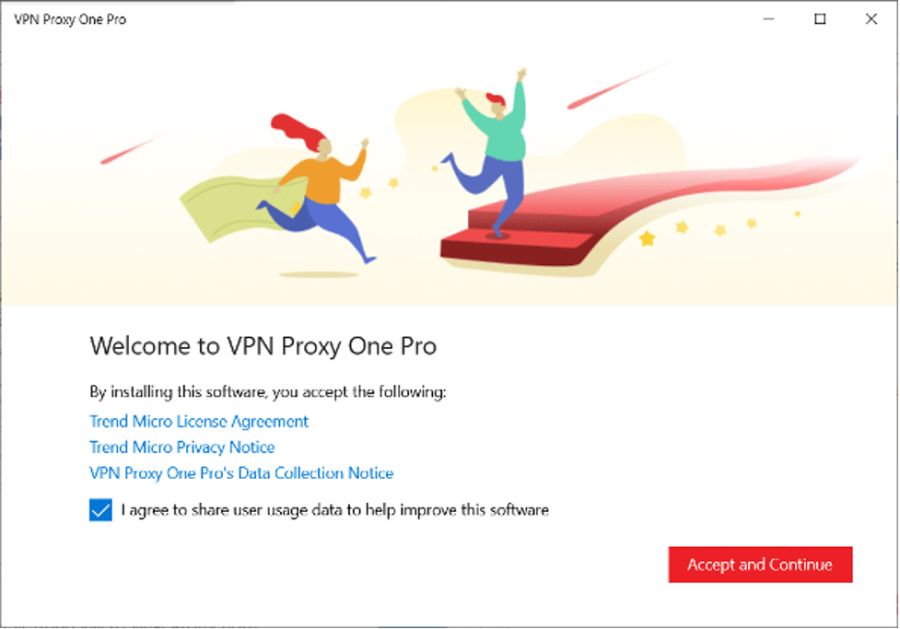
- Select Allow.
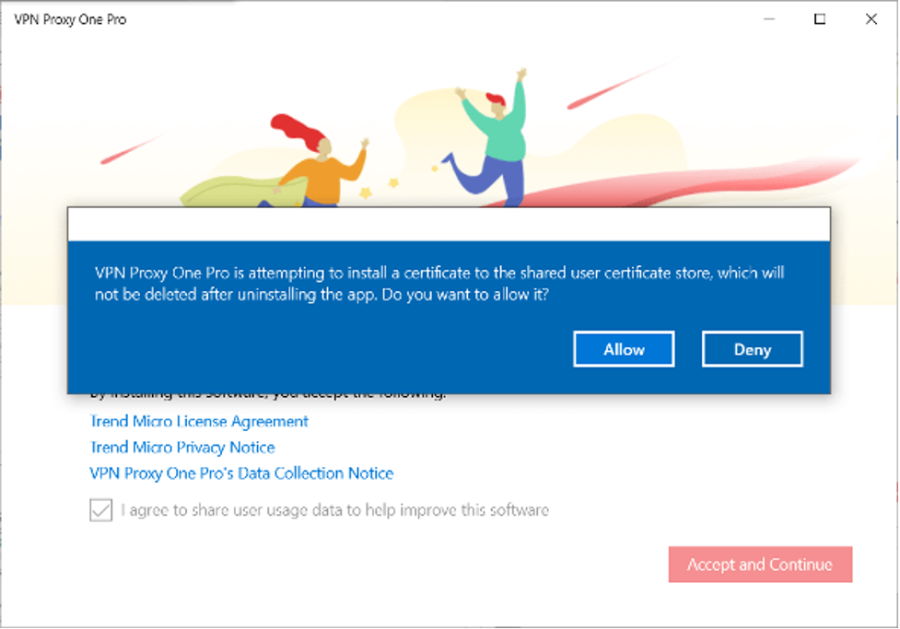
- Click OK.
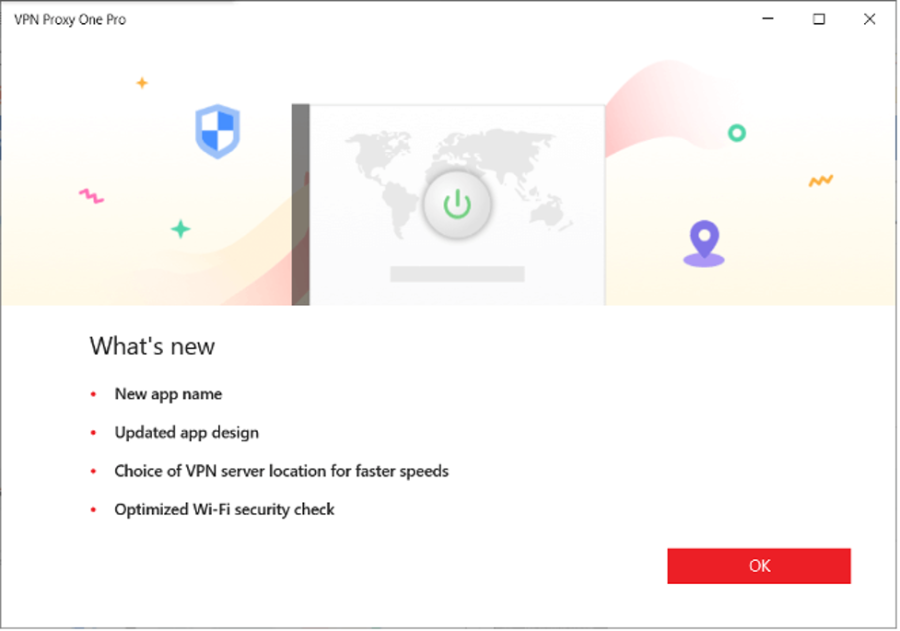
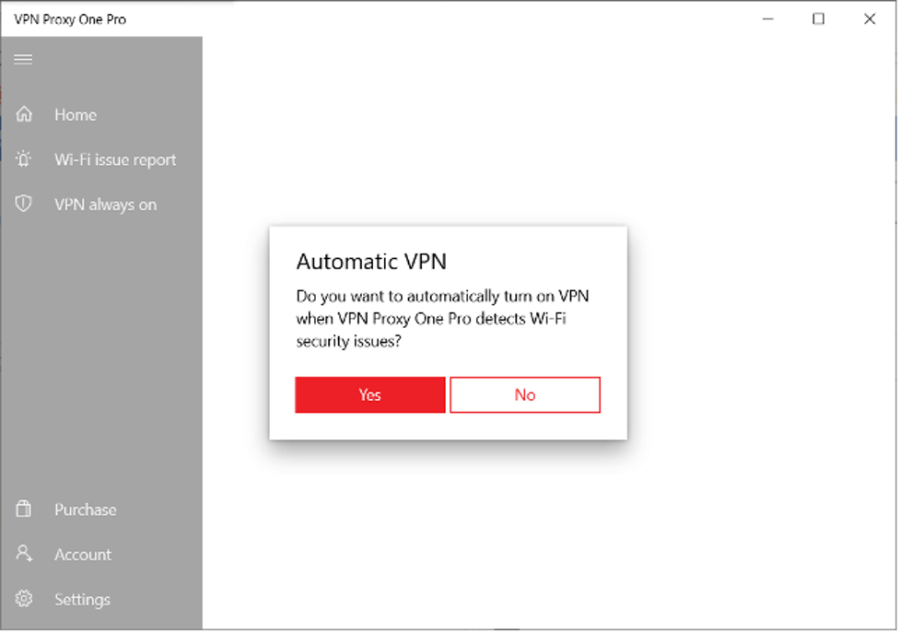
Now the app is configured, click either Yes or No depending on whether or not you want the VPN to turn on automatically if Wi-Fi security issues are detected.
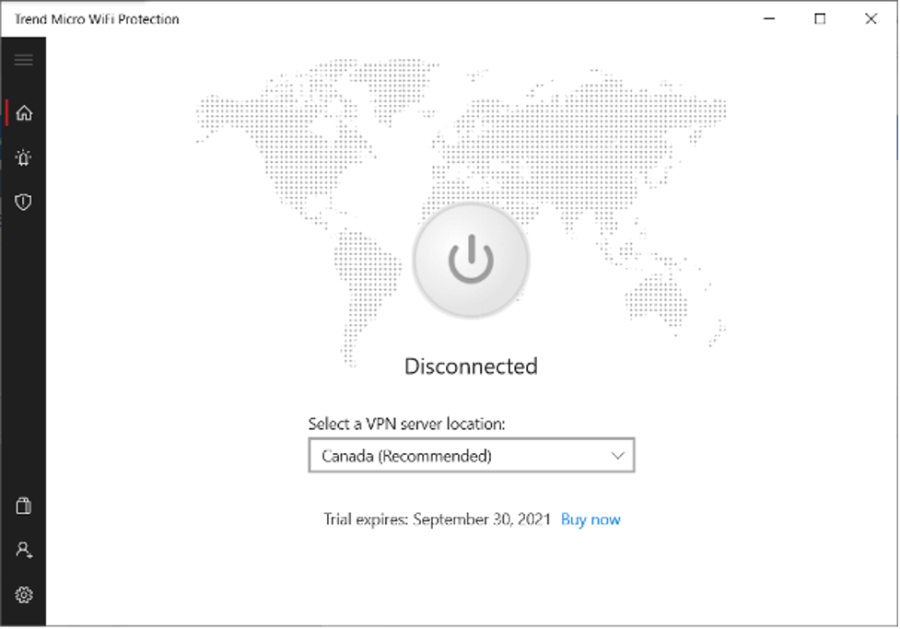
- Click the Power icon to connect to a VPN server.
How to use a VPN on Mac
- Click here to download VPN Proxy One Pro for Mac.
- Once it’s downloaded, open the app to begin set up.
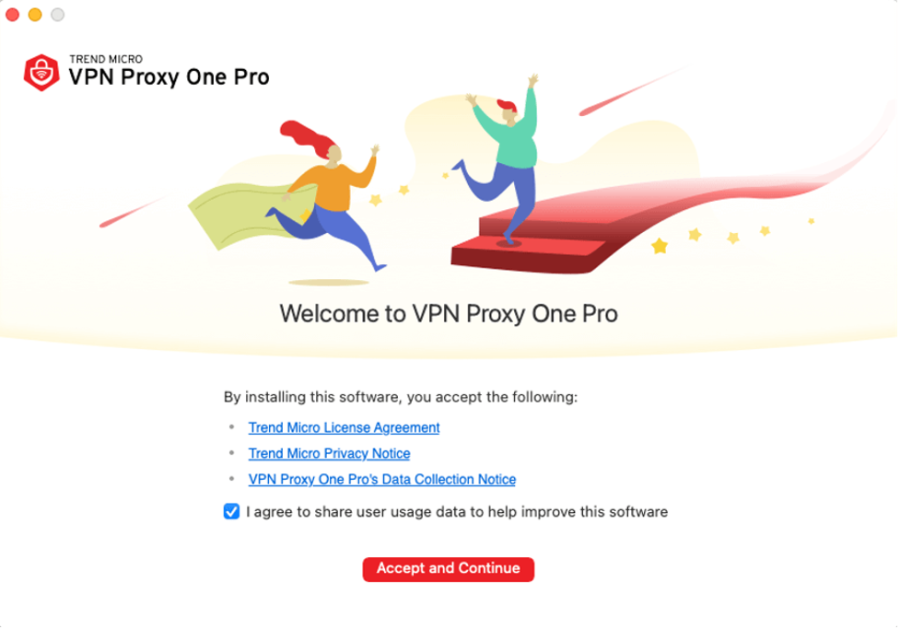
- Click Accept and Continue.
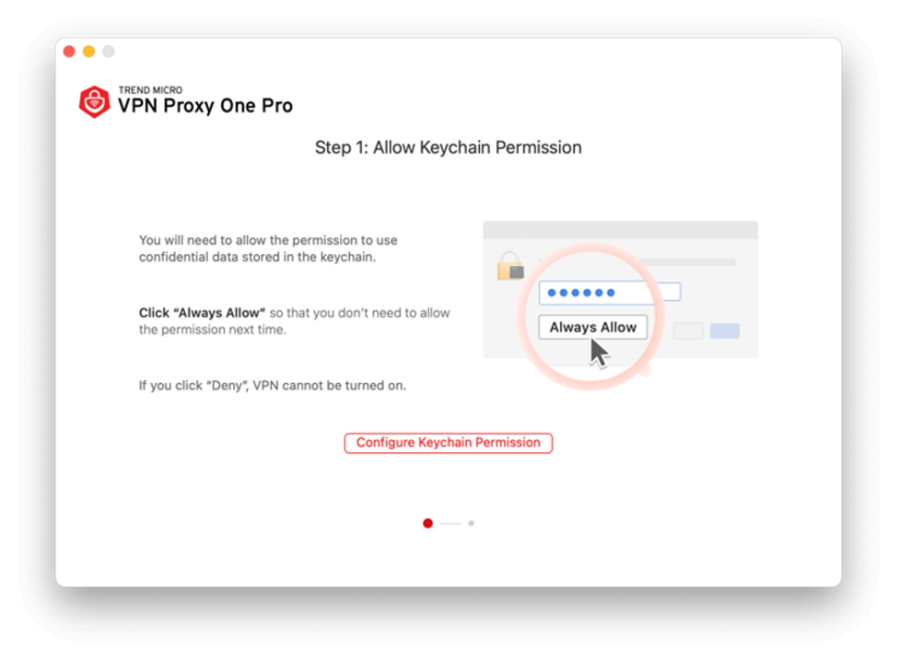
- Click Configure Keychain Permission.
- Select Configure VPN Permission.
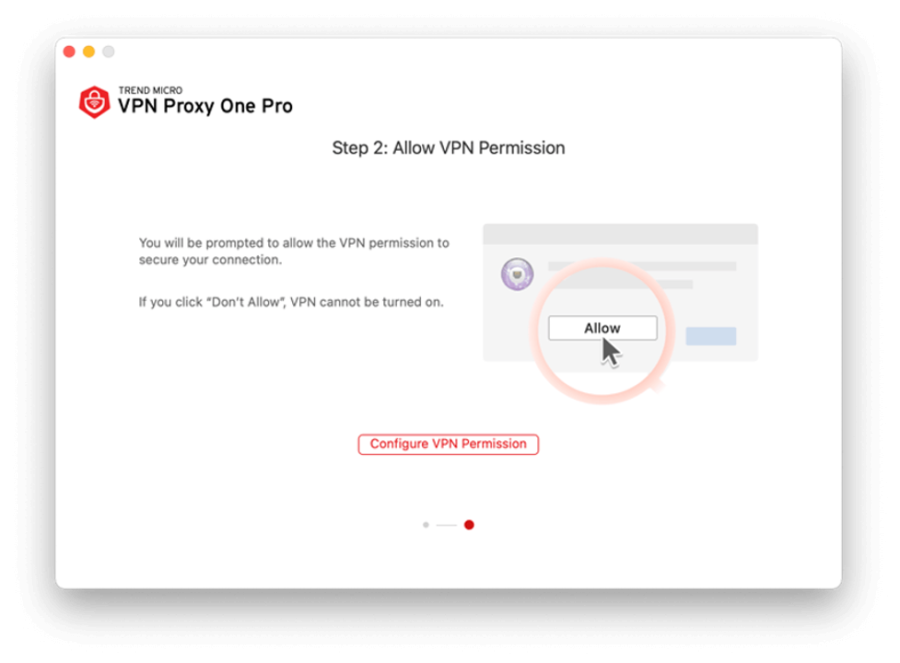
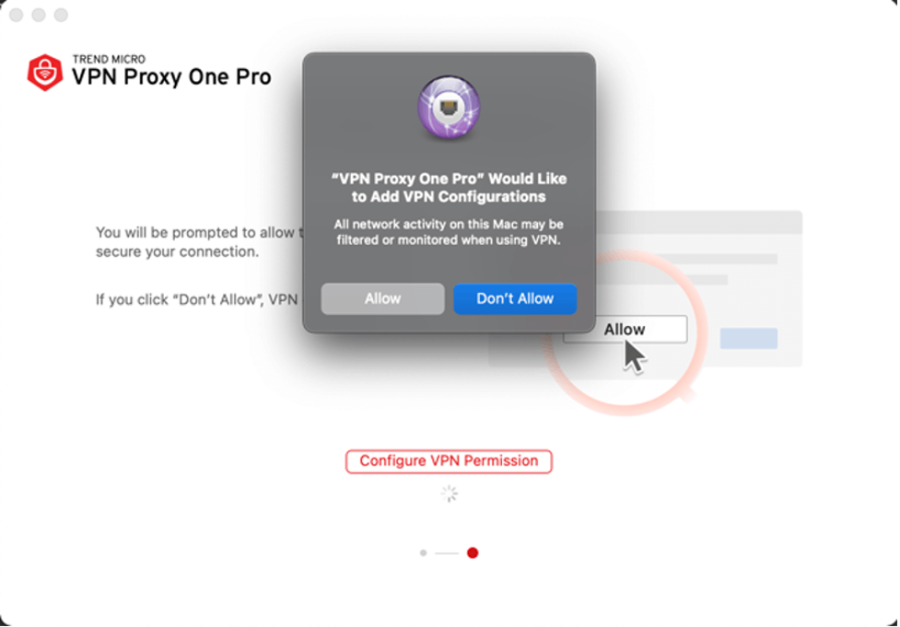
- Select Allow.
- Click on OK.
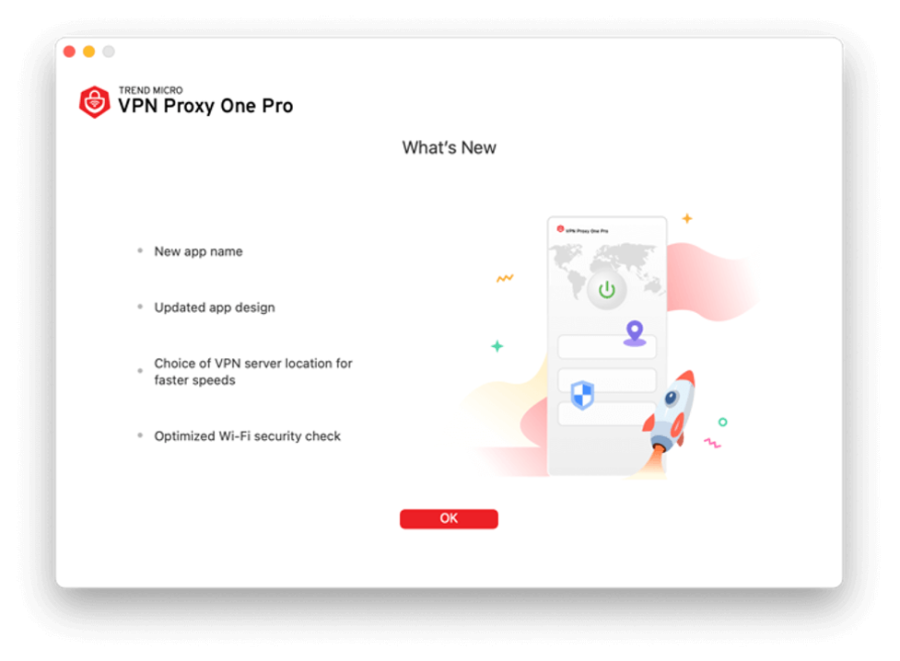
- Now the app is configured, click either Yes or No depending on whether or not you want the VPN to turn on automatically if Wi-Fi security issues are detected.
- Click the Power icon to connect to a VPN server.
Report a Scam!

Have you fallen for a hoax, bought a fake product? Report the site and warn others!
Scam Categories
Help & Info
Top Safety Picks
Your Go-To Tools for Online SafetyDisclaimer: Some of the links here are affiliate links. If you click them and make a purchase, we may earn a commission at no extra cost to you.
- ScamAdviser App - iOS : Your personal scam detector, on the go! Check website safety, report scams, and get instant alerts. Available on iOS
- ScamAdviser App - Android : Your personal scam detector, on the go! Check website safety, report scams, and get instant alerts. Available on Android.
- NordVPN : NordVPN keeps your connection private and secure whether you are at home, traveling, or streaming from another country. It protects your data, blocks unwanted ads and trackers, and helps you access your paid subscriptions anywhere. Try it Today!
- Incogni : Incogni automatically removes your personal data from data brokers that trade in personal information online, helping reduce scam and identity theft risks without the hassle of manual opt-outs. Reclaim your privacy now!
Popular Stories
As the influence of the internet rises, so does the prevalence of online scams. There are fraudsters making all kinds of claims to trap victims online - from fake investment opportunities to online stores - and the internet allows them to operate from any part of the world with anonymity. The ability to spot online scams is an important skill to have as the virtual world is increasingly becoming a part of every facet of our lives. The below tips will help you identify the signs which can indicate that a website could be a scam. Common Sense: Too Good To Be True When looking for goods online, a great deal can be very enticing. A Gucci bag or a new iPhone for half the price? Who wouldn’t want to grab such a deal? Scammers know this too and try to take advantage of the fact. If an online deal looks too good to be true, think twice and double-check things. The easiest way to do this is to simply check out the same product at competing websites (that you trust). If the difference in prices is huge, it might be better to double-check the rest of the website. Check Out the Social Media Links Social media is a core part of ecommerce businesses these days and consumers often expect online shops to have a social media presence. Scammers know this and often insert logos of social media sites on their websites. Scratching beneath the surface often reveals this fu
How do I recover my crypto after it’s stolen? What happens if your crypto wallet is compromised? Can stolen crypto be traced, and can police actually recover crypto in 2026? These are the questions most people ask within minutes of realizing their wallet has been drained. Crypto theft is fast, quiet, and unforgiving. By the time most victims notice something is wrong, the funds are already moving across the blockchain. Once seen as a problem for exchanges and whales, crypto theft now heavily affects everyday investors. Phishing links, fake support chats, wallet approval scams, SIM swaps, and malware attacks have become common. Knowing what recovery realistically looks like—and what it doesn’t—can prevent panic, bad decisions, and costly follow-up scams. In a Nutshell Crypto recovery is possible, but only in limited situations Blockchain transactions are irreversible, but stolen crypto can still be traced Speed and documentation matter more than optimism Police and exchanges play a bigger role than private recovery services Guaranteed recovery offers are almost always scams Is it Actually Possible to Recover Stolen Crypto? Yes, crypto recovery is possible, but only under specific conditions and rarely through direct action by the victim. Blockchain transactions are final by design. Once crypto is sent and confirmed, it cannot be reversed. There is no central authority, no chargeback process, and no technical “undo” button, even if the transaction was clearly fraudulent. This is where many people ask whether stolen crypto can be traced. In most cases, it can. Every transaction